


Birthday Greetings & Wishes
4.878.00 Reviews
App Specs
- Version
- 3.1.0
- Updated On
- License
- Free
- Downloads
- 1,000,000+
- Developer
- Galaxy studio apps
- Categories
- Events
- Platform
- Android
Screenshots


 Analysis by AppCompare
I usually reach for a birthday-card app when I know someone’s day is coming but don’t have time to make a card from scratch. That is the practical appeal of Birthday Greetings & Wishes: it gives me a place to browse ready-made designs, choose a tone, and turn a quick thought into something more personal. It is an events app from Galaxy studio apps, and its focus is squarely on greetings rather than calendars or party planning.
The key question is whether a pre-designed card helps you express something you actually mean, or simply gives you a polished image to send. In my experience, it works best when I treat the design as a starting point and add a specific line of my own. A short memory, an affectionate nickname, or a detail about the person can make a template feel like a message from me rather than a generic greeting.
When a quick card is the right tool
I can see this being useful for the birthdays that creep up during an ordinary workday: a relative posts a reminder, a colleague mentions a celebration, or I realize I have not sent anything to a friend who lives far away. Instead of searching the web for an image and then figuring out how to share it, I can use one app to look for a suitable greeting and prepare a response.
It is also a better fit for people who like sending visual wishes but do not want to learn a design program. If you enjoy making every detail yourself, or want a carefully composed card with your own photos and typography, a full-featured editing app will give you more control. This app’s value is convenience, not an unlimited creative canvas.
Getting Started with Birthday Greetings & Wishes
First off, getting this app up and running is a breeze. Available on both Android and iOS, just a quick search in your app store, and you’re ready to download. Installation is smooth, and you'll be greeted with a straightforward interface that’s easy on the eyes. Trust me, even if tech isn’t your forte, you’ll navigate this app like a pro in no time.
Features That Stand Out
Now, let’s talk about the features that had me doing a happy dance. Birthday Greetings & Wishes comes packed with pre-designed templates that cater to all tastes and preferences. Whether you’re looking for something heartfelt, funny, or just plain cute, this app has got you covered. You can customize these templates with personal messages, adding that special touch that makes all the difference.
One cool feature is the ability to set reminders for upcoming birthdays. No more awkward belated wishes! Just input your friends’ and family’s birthdays, and the app will give you a nudge when it’s time to send those greetings. It’s like having a personal assistant dedicated to your social life.
Worth Reading Before You Choose

Flipboard Shows What News Apps Must Do Beyond the Feed

Switching to Android Auto Means Rethinking Your Driving Routine

Google Calendar Makes a Crowded Week Easier to Manage

Ludo King Makes the Most of the Minutes Between Plans

Baby Panda World Brings Quick Play to Modern Phones, but Its Game Library Feels Busy

ESPN’s Live Game View Makes Following Close Games Easier
A workflow that saves time without losing the personal touch
My most reliable approach is to decide on the recipient and mood before I browse. For a close friend, I look for something playful and write a line that sounds like our normal conversation. For a family member I do not see often, I lean toward a warmer style and make the message more specific. That small decision up front keeps me from scrolling through designs that look attractive but do not suit the relationship.
Then I treat the card and the message as two separate jobs. The artwork sets the tone; my words carry the personal detail. I avoid relying on a template’s sentiment alone, especially for someone important, and check that the text reads naturally when placed alongside the design. A concise note often feels more sincere than a long message squeezed into a visual card.
Before sending, I pause to confirm the recipient and the occasion. This sounds obvious, but a card can be easy to share quickly, and the wrong chat or a public post can turn a kind gesture into an awkward one. I also consider whether the person prefers a private message, an email, or a social post. The app can help prepare the greeting, but choosing the right destination is still my responsibility.
Design & User Experience
The app’s design is as vibrant as the greetings it offers. With a clean layout and intuitive navigation, finding your way around is super easy. The graphics are eye-catching without being overwhelming, allowing you to focus on crafting the perfect message. I especially appreciated the organized categories that make browsing through templates a breeze.
Another aspect that’s worth mentioning is the speed. The app runs smoothly without any annoying lags, which is a huge plus when you're in a hurry. This seamless performance ensures that you can whip up a greeting card in just a few minutes.
Choosing a design that still feels like you
One useful trick is to pick a card for the recipient rather than for my own taste. A bright, joke-filled design may suit a sibling who enjoys teasing, but could feel out of place for a work contact or an older relative. I also look at how much room the design gives my message. A short caption suits a compact layout; if I have something more personal to say, I prefer a design that does not make the text feel like an afterthought.
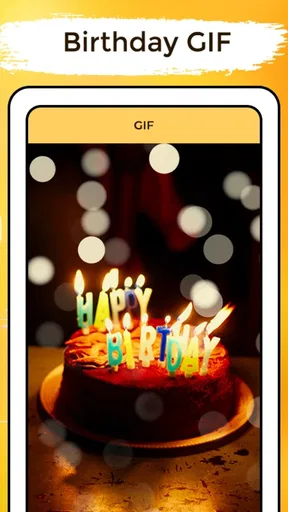
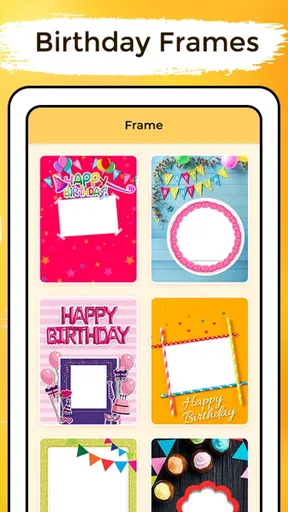
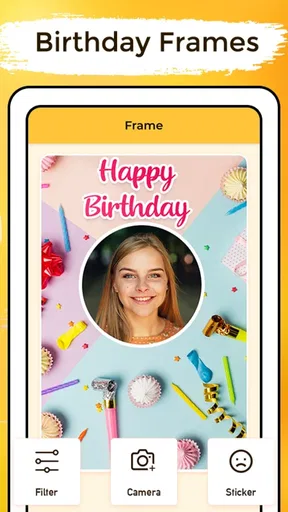
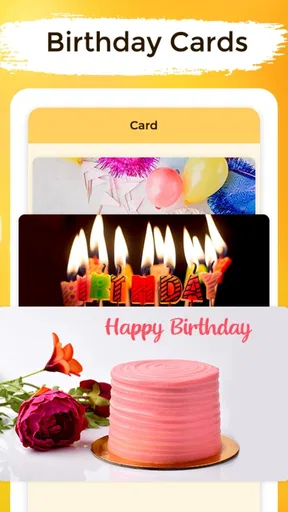
The app’s range of birthday cards, frames, GIFs, and Father’s Day wishes gives it more than one kind of visual greeting to explore. That mix is convenient, but it also means I should slow down enough to choose the right format. A GIF can feel lively in a chat, while a still card may be easier to save or print. For Father’s Day, the dedicated wishes can spare me from trying to adapt a birthday message to a different occasion.
Sharing the Love
Once you’ve created your masterpiece, sharing it is a piece of cake. The app allows you to send your custom greetings directly through messaging apps, email, or even post them on social media. I’ve found this incredibly handy, especially when trying to reach friends across different platforms.
Moreover, if you’re feeling a bit old-school, you can also save your creations and print them out. This flexibility makes the app suitable for everyone, from digital natives to those who cherish physical keepsakes.
Handoffs, privacy, and the last check
Sharing is the point where a card leaves the app and becomes part of a conversation. I like having several possible destinations because I do not have to rebuild the greeting for each person’s preferred channel. Still, it is worth checking the final preview and the destination before sending. A saved image gives me more control over when and where it goes; a direct share is faster when I am already in the right chat.
Printing is a different kind of handoff. A digital design can be a thoughtful small keepsake, but it is not automatically a finished physical card: the recipient, paper, and printer all affect the result. If I need a formal printed invitation or a high-quality custom card for a milestone, I would use a dedicated print or design service instead. For an informal personal note, saving a creation and printing it can be a nice middle ground.
Where convenience has limits
Ready-made templates make the first step easier, but they also set boundaries. If none of the designs fits the person, occasion, or tone I have in mind, browsing longer may not solve the mismatch. I would switch to a blank design tool or write a plain message rather than force a sentimental card onto someone who prefers a simple note. Likewise, people who want a searchable birthday calendar, event invitations, RSVP tracking, or a shared family schedule should look for an app built around those tasks; a greeting-focused tool is not a substitute for event management.
There is a small but important difference between a reminder and a complete system for remembering birthdays. A reminder can prompt me to act, but I still need to enter the dates correctly and keep track of whom I want to contact. I would pair it with whatever calendar or personal routine I already trust rather than assume a greeting app will organize every social commitment for me. That keeps the useful nudge without making the app responsible for a broader job it is not designed to do.
What it costs and who should consider it
The app is free to download, with optional in-app purchases ranging from $0.99 to $99.99 per item. I would check the purchase screen carefully before committing, especially if I only need an occasional card. For casual use, the free starting point is appealing; anyone considering paid items should decide whether the specific content is worth it to them rather than assuming every design is included.
It has a 4.8 average from around 2.2 thousand ratings, and more than 500 thousand installs. It is rated for Everyone, with version 3.1.0 and Android 7.0 as the minimum operating system. Those details make it easy to judge basic compatibility, but they do not change the main decision: the app suits people who want quick, visual greetings and are happy to personalize a template, while heavy card makers and event organizers may prefer more specialized tools.
Why It’s Worth a Try
In a world where personal connections can sometimes feel fleeting, Birthday Greetings & Wishes offers a simple yet effective way to remind your loved ones that you care. It’s more than just an app; it’s a tool to help you maintain and strengthen relationships with a thoughtful touch.
So, if you’re looking to up your birthday game without breaking a sweat, give this app a whirl. It’s user-friendly, versatile, and, best of all, adds a sprinkle of magic to someone’s special day. Go ahead, spread the joy and watch as smiles light up from screen to screen!
And there you have it—my take on Birthday Greetings & Wishes. Happy greeting!
Pros
- User-friendly interface for easy navigation.
- Wide selection of customizable templates.
- Option to schedule greetings in advance.
- Includes reminders for upcoming birthdays.
- Integrates seamlessly with social media.
Cons
- Limited free templates without purchase.
- Requires account for full feature access.
- Ads can be intrusive in free version.
- Occasional glitches in notification system.
- Some features locked behind paywall.
FAQs for Birthday Greetings & Wishes
What features does the Birthday Greetings & Wishes app offer?
The app provides a variety of features to enhance birthday celebrations, including customizable greeting card templates, a wide selection of wishes and messages, and the ability to schedule and send greetings via email or social media. Users can also add personal photos and music to create unique, heartfelt messages.
Is the Birthday Greetings & Wishes app free to use?
The app offers a free version with basic features, but there are in-app purchases available for premium templates, designs, and additional customization options. Users can choose to upgrade for a more comprehensive experience, but the free version is quite robust for everyday use.
Can I personalize messages in the Birthday Greetings & Wishes app?
Yes, personalization is a key feature of the app. Users can customize messages by selecting from a variety of fonts, colors, and styles. Additionally, there is an option to add personal photos and audio, making each greeting unique and tailored to the recipient.
How easy is it to use the Birthday Greetings & Wishes app?
The app is designed with user-friendliness in mind, featuring an intuitive interface that guides users through the process of creating and sending greetings. Even those with minimal technical skills can easily navigate the app, making it accessible for all ages.
Does the Birthday Greetings & Wishes app require an internet connection?
An internet connection is required to download and update the app, as well as to access certain features like online templates and sharing options through social media. However, users can create and save greetings offline, sending them once a connection is available.


